
Don't Send the Customer Away. Bring the Expert In.
Team Chat
"Let me check and get back to you” kills conversation momentum. Privately text the teammate who knows the answer, directly inside the text thread. They see the full history and your customer never has to repeat their story.

Handoffs Are Costing You Customers.
Watch what happens the next time somebody on your front line gets a question they can't answer. Count the steps between that moment and the customer getting an answer. The good news: you can easily fix this ... with Captivated!
Forgotten Callbacks
A customer asks a question. Your team says they'll find out. Then the day happens. By the time you circle back, your customer called someone else, who answered on the first try.
Explaining It Twice
When conversations are transferred, context is lost. Now the customer is re-describing their concern to a second person, and the whole interaction has started over. Not a great experience.
The Scattered Record
Half the context is in a text, half in an email, half in somebody's head. When your customer calls back next month, nobody can reconstruct what was actually said ... or agreed to.
Talk to Your Team Without Leaving the Customer.
There are two kinds of internal communication: the kind that belongs inside a specific customer conversation, and the kind that doesn't. Captivated helps you win at both.
Private Notes. Right in the Thread.
- Drop internal notes in the thread. Only your team sees them.
- Record what happened off-channel too: "Spoke to them by phone, they're coming in next week."
- The note stays with the conversation permanently, so next month's question has last month's context.
@Mention the Person Who Knows
- Tag any user or any team inside a note and they're notified about the conversation.
- If they join, they can reply to the teammate and to the customer from the same screen.
- Or transfer the conversation outright when another person should own it from there.
For Everything Else
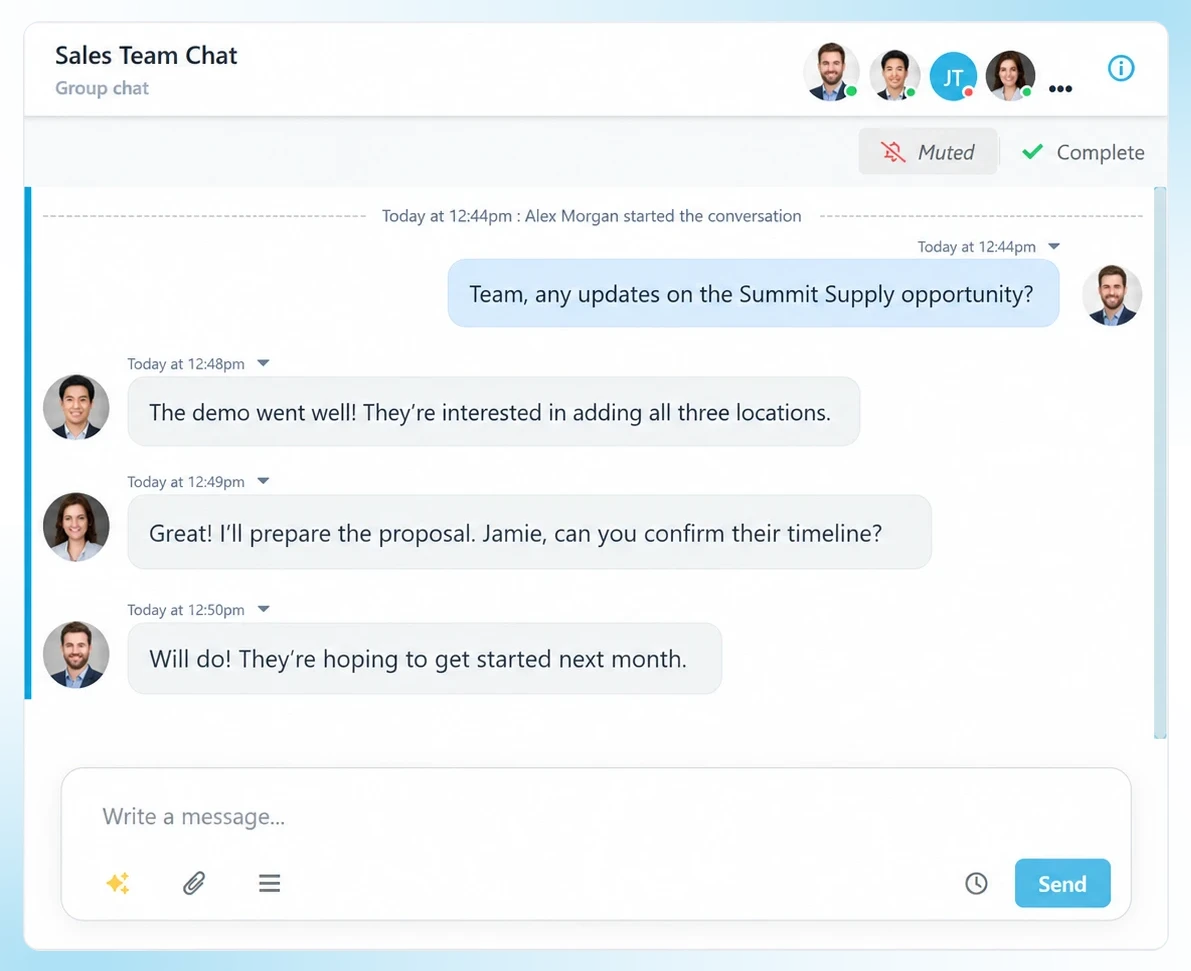
- One-to-one direct messages facilitate strong, internal conversations with any colleague.
- You can group chats by topic or by team, with replies visible to everyone in the thread.
- Attach PDFs, spreadsheets, photos, videos, or voice memos to any of it.
Reminders that Work
- Schedule an internal note for a future date and time, a reminder to yourself or a nudge for a teammate.
- Filter your conversation list to "scheduled" to see every internal note and message queued up ahead of you.
- Delete internal reminders that are no longer relevant. Reschedule anything that still is.
We Help You Keep the Whole Team Informed.
Business texting collaboration features fail for one boring reason: not everybody has a seat. And all too often, the person you needed doesn't have a login. That's why we license by location, not by seat.
1200+
businesses served across a decade of business texting.
98%
of our customers would recommend Captivated to industry peers.
5 Star
Google reviews and SOC 2, HIPAA and CCPA credentials.
90%
report reduced admin effort and improved efficiency.
Live
U.S.-based support from real people.
With Team Chat from Captivated
Your team can tag one another, even within a customer conversation, to send internal notes regarding customer requests, and to bring others into the conversation. All customer conversation history stays in one unified spot, for easy team coverage.

Subaru
Captivated is a great communication platform for our business. It has automatic follow ups so I can focus on other things, reminders to book, reschedule if needed, and is an all around easy way to communicate with our customers. We use it for our Love Encore program here at Subaru and it has really helped with scheduling more appointments. Captivated also has great customers service and support.
– Subaru Manager
3 Steps to a Team That Answers Together
Get your personalized pricing.
Build your quote online (no sales call required). Or book a demo. Either way, we look forward to serving you!
We set up your teams and queues.
Once you're using Captivated, our launch team builds your departments, sets permissions, and gets everyone (e.g., office, field, management) into the account.
Tag somebody.
It's that easy. Most teams are mentioning each other inside customer threads within an hour of going live.
Important Note: One site license. Unlimited users (no "per seat" billing nonsense, ever). Real humans in support, and a launch team that does the setup with you.
What Changes When Your Team Works in One Place
Time to a Specialist Answer
Without This Service:
A callback promise, then hours or a day
With Captivated:
An @mention, and the expert joins the live thread
Practical Impact:
The customer gets a real answer while still engaged
Context Lost in Handoffs
Without This Service:
Customer re-explains to each new person
With Captivated:
Full history visible to everyone who joins
Practical Impact:
No repeated explanations, fewer errors
Where Internal Context Lives
Without This Service:
Split across email, chat apps, and memory
With Captivated:
Attached permanently to the customer conversation
Practical Impact:
Next month's question starts with last month's answer
Team Coverage
Without This Service:
Only the license-holder can see or respond
With Captivated:
Unlimited users on one site license
Practical Impact:
Anyone who can help, can help
The Bottom Line
Without it: your customers get the knowledge of whoever answers, instead of the knowledge of your whole company. That critical gap is invisible on your end, but extremely visible on theirs.
Frequently Asked Questions
No. Internal notes are visible only to Captivated users on your account. They render differently from customer messages inside the thread, so there is no ambiguity about which is which. The customer sees only the text messages you send them.
They get notified about the conversation and can either join it or dismiss the mention. If they join, they see the full history and can reply to you privately in a note, or reply directly to the customer by text, from the same screen.
Internal notes live inside a specific customer conversation. Team Chat is for everything that doesn't belong there: direct messages, group chats by topic or team, and one-way internal announcements sent BCC so replies come back to you individually.
No. Captivated licenses by location, not by seat. Add the office, the technicians, and the managers without doing the math on who is worth a license. That's the point, because the person you need in the conversation is too often the one you'd have left out.
Yes. Schedule an internal note for a future date and time, addressed to yourself or a teammate. Filter your conversation list to "scheduled" to see everything queued up, and delete or reschedule anything that changes.
Ready to Say Goodbye to Poor Handoffs?
Book a 30-minute demo and see what it looks like when the expert joins the conversation instead of the customer waiting for a callback.
Already a customer? Text Captivated Support at 317-316-3600.
