
Safe Text · TCPA & Messaging Compliance
Customers Choose What They Hear
On most platforms, one STOP costs you the appointment reminders and the relationship along with the coupons. With Captivated, customers choose which texts to keep and which to skip—and you keep a record of their consent.

Every Text Your Business Sends is One of Three Kinds
Texting is the fastest way to reach people and the wrong way to manage sensitive conversations. Many teams discover this the hard way.
Your People
Two-way conversation with a person or team the customer knows: their salesperson, their service advisor, your office.
Starts when the customer texts first or asks to be texted.
Updates
Information about business the customer already has with you: appointment reminders, technician on the way, vehicle ready, closures.
Never promotional.
Offers
Anything that promotes buying something: coupons, seasonal specials, sales events, add-ons.
Always optional, with its own clear consent, and off until the customer turns it on.
A customer can keep their advisor and their service reminders and still say no to promotions. With one number, a number for each department, or a number for every salesperson, the customer sees a single page under your name.
Your Team Sends With the Same Rules Built In
Before an announcement goes out, the sender says what kind of message it is. That answer decides who is eligible, so nobody has to remember who opted out of what.
- An Update cannot carry a promotion. Add a coupon and it becomes an Offer, sent only to customers who said yes to offers.
- The sender sees how many customers are eligible and why the rest are excluded. Excluded customers cannot be added back by hand.
- Permission is checked again for each person at the moment the message sends.
- Every announcement names the team that will answer replies.
STOP Always Means Stop
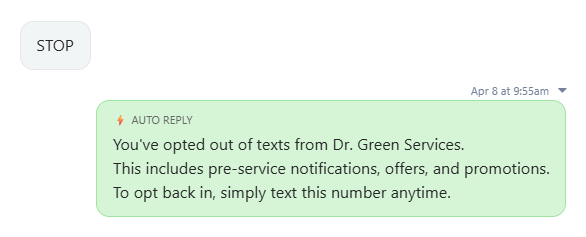
A STOP reply to any of your numbers opts the customer out of your whole business, right away. One confirmation goes back with a link to their preference page, so a customer who only wanted fewer offers can choose specific texts again. If they do nothing, they stay opted out.
Captivated honors stop, quit, end, revoke, opt out, cancel and unsubscribe, and routes other plain-language requests to your team to act on.
Captivated honors stop, quit, end, revoke, opt out, cancel and unsubscribe, and routes other plain-language requests to your team to act on.
The Same Page, in the Words of Your Business.
Before an announcement goes out, the sender says what kind of message it is. That answer decides who is eligible, so nobody has to remember who opted out of what.
Automotive Dealerships
A customer keeps texting their salesperson and service advisor, keeps vehicle-ready and recall notices, and chooses service coupons without sales events. Sales, Service and Parts numbers appear as one dealership.
Lawn Care and Green Industry
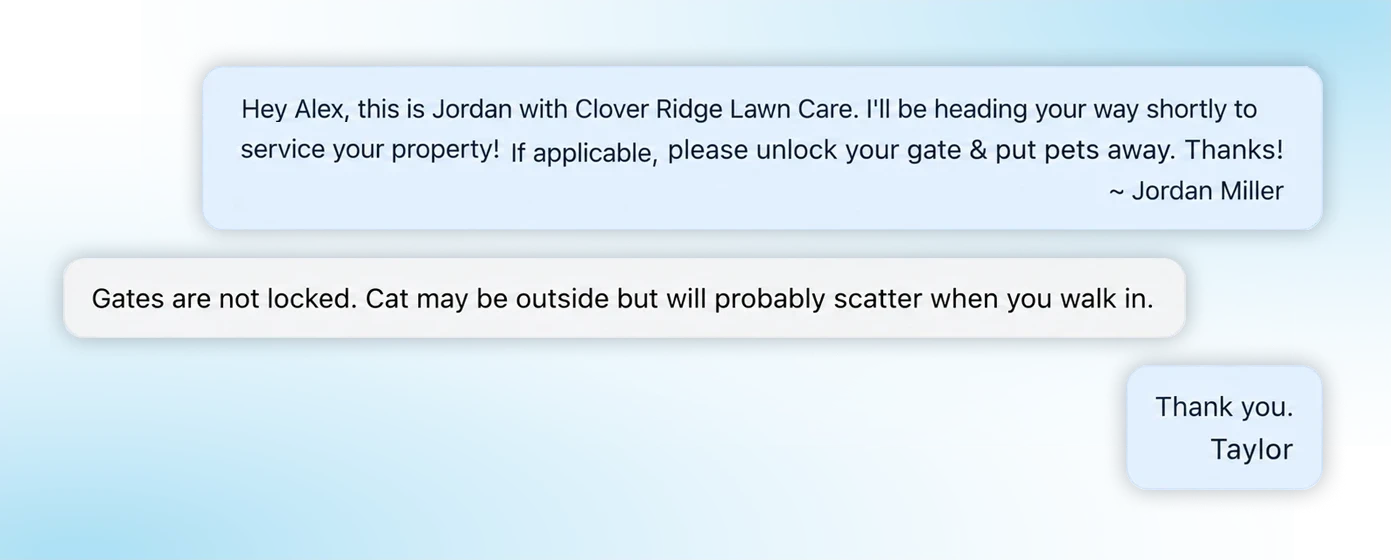
A homeowner gets technician and weather-delay notices and texts the office about their account, with in-season offers turned off. It works for an owner-operator with one number or a franchise with dedicated salespeople.
Retail
Showroom
A salesperson shares a contact card on the floor and the shopper texts back a photo of the sofa they are replacing. Delivery updates stay on. Sale announcements are the shopper's choice.
A Record You Can Show
Captivated is the system of record for your messaging consent and preferences. When a customer, a carrier or a regulator asks why someone received a text, you can answer.
For multi-location and enterprise teams, consent collected in other systems can be sent to Captivated, checked before a message sends, and kept in sync when a customer changes their mind. The same record covers SMS, RCS and toll-free numbers.
For multi-location and enterprise teams, consent collected in other systems can be sent to Captivated, checked before a message sends, and kept in sync when a customer changes their mind. The same record covers SMS, RCS and toll-free numbers.
Who gave permission, and for which mobile number
What kind of texts they agreed to, by department
The wording they saw when they agreed
When and where it was collected
Every change since, including opt-outs
Why a given message was allowed or blocked
Safe Text Messaging Guidelines
What Every Business Texting Customers Should Do
Captivated is designed to support compliant, high-quality customer communication at scale. As messaging continues to evolve, it is important that businesses follow established best practices when communicating with customers.
Important
Captivated provides the platform for messaging. Each business is responsible for obtaining proper consent and ensuring compliance with applicable laws and regulations, including the Telephone Consumer Protection Act (TCPA).
Sample Opt-In Language
Service & Appointment Messaging
"By providing your phone number, you agree to receive text messages from [Business Name] about your service, appointments and related updates. Message and data rates may apply. Reply STOP to opt out."
"By providing your phone number, you agree to receive text messages from [Business Name] about your service, appointments and related updates. Message and data rates may apply. Reply STOP to opt out."
Offers, as a separate unchecked box.
"Yes, text me offers and specials from [Business Name]. Consent is not a condition of purchase. Message frequency varies. Message and data rates may apply. Reply STOP to opt out."
"Yes, text me offers and specials from [Business Name]. Consent is not a condition of purchase. Message frequency varies. Message and data rates may apply. Reply STOP to opt out."
Web forms and scheduling.
Put the disclosure next to the phone number field, with a checkbox the customer ticks themselves.
Put the disclosure next to the phone number field, with a checkbox the customer ticks themselves.
Verbal opt-in.
Acceptable for a one-to-one conversation the customer asked for. Record who took it and when, and follow up with a written confirmation. It does not cover offers.
Acceptable for a one-to-one conversation the customer asked for. Record who took it and when, and follow up with a written confirmation. It does not cover offers.
Updates Versus Offers
Updates
(Transactional)
- Service updates
- Appointment reminders
- Delivery notifications
- Closures and schedule changes
Expected as part of an existing interaction.
Offers
(Promotional)
- Marketing campaigns
- Offers and discounts
- Re-engagement outreach
- Add-ons inside a reminder
Requires clear, separate consent.
Best Practices
- Only text customers who have given consent for that kind of message.
- Keep each message relevant to the customer's business with you.
- Send at reasonable hours and at a reasonable frequency.
- Do not mix marketing into service messages without consent
- Identify your business in every announcement.
Opt-Out Requirements
- Customers can always reply "STOP."
- Honor any reasonable opt-out request, in whatever words the customer uses, and do it promptly.
- A preference page is a convenience. It can never be the only way to opt out.
- Do not text a customer again after an opt-out unless they opt back in themselves.
These standards apply across channels, including Rich Communication Services (RCS) and toll-free messaging. For carrier registration, see TCR & 10DLC Compliance.
Additional Information
Frequently Asked Questions
No. STOP ends all texts from your business. The confirmation includes a link so the customer can choose to receive specific texts again if that is what they want.
Only if that customer said yes to offers. An offer is an offer whether it goes to one person or a thousand.
No. Existing consent can be brought into Captivated with its supporting details. A later opt-out always wins over an imported opt-in.
It gives you the tools and the record. Your business remains responsible for getting proper consent and following the law. We recommend reviewing your consent wording with your own counsel.
"Here is how to reach me, and you choose what you hear from us."
Book a 30-minute demo to see the Captivated customer page and the sending tools. We'll walk through exactly what it does and where your responsibilities begin.
Already a customer? Text Captivated Support at 317-316-3600.
