
Enable Customers to Book Appointments.
Text-Based Booking & Scheduling
Make it ridiculously easy for your customers to get on your calendar. Text them a link connected to your Google or Outlook calendar. They pick a time, it lands on your schedule, and reminders are sent automatically.

Too Many Reasons Why Your Calendar Isn't Full.
Scheduling failures rarely look dramatic. They look like a calendar with holes in it and a team that can't explain exactly where they came from. Here are the top three challenges many businesses face today.
The 9 to 5 Scheduling Trap
It's 8:00 pm and your customer finally has time to book their appointment. But if you require a phone call during business hours, it's not unlikely that customer's business will go elsewhere.
Back & Forth Negotiations
"How's Tuesday?" "No? OK, how about Thursday?" "In the afternoon?" Three exchanges, spread over two days, repeated across every appointment your team books by hand.
The No-Show Nobody Filled
Manual appointments reminders are tedious and time-consuming on most weeks and the first thing to go on a busy one ... which ends up being the week you needed them most.
Your Up-to-Date Calendar. In a Text Message.
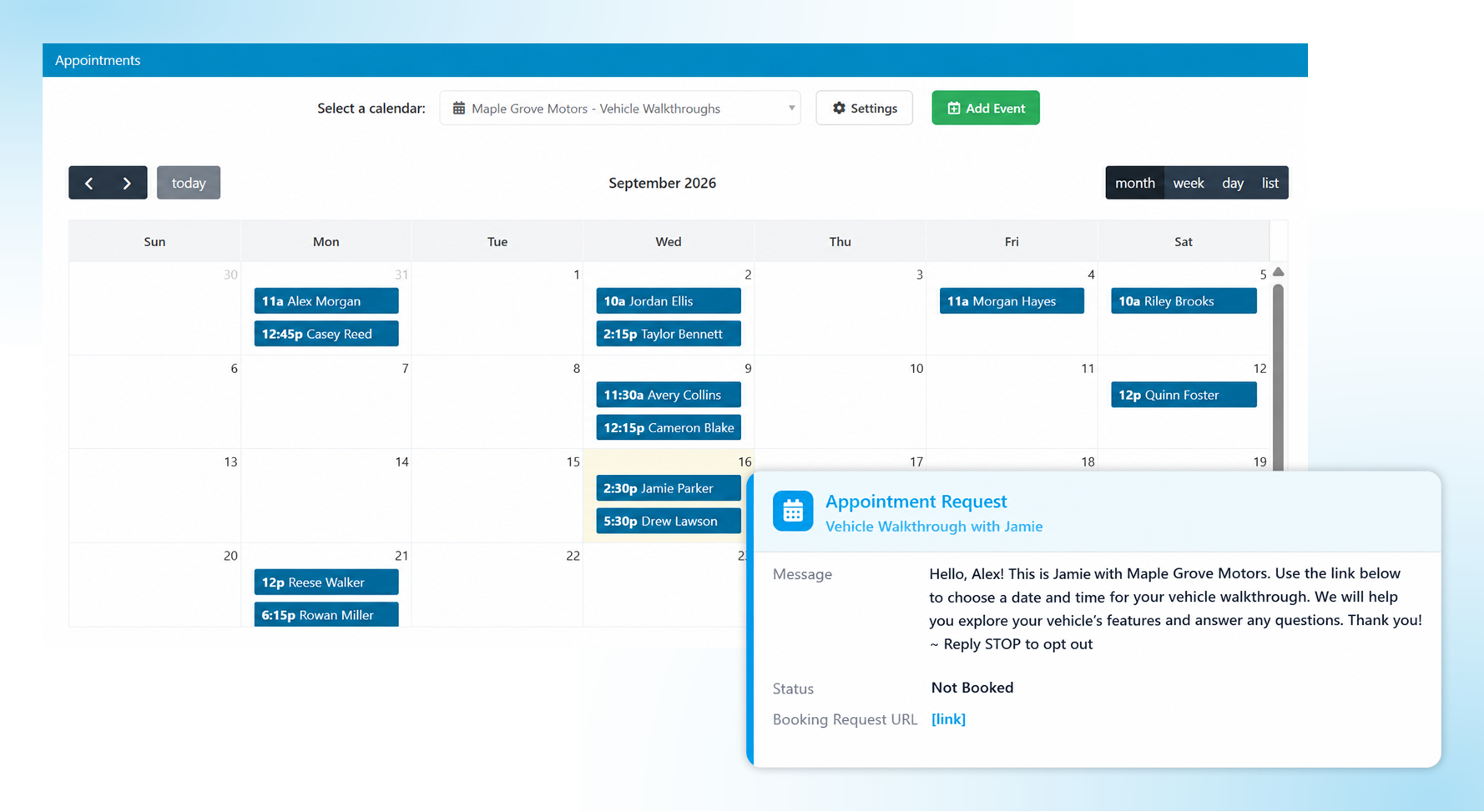
This isn't a separate scheduling product you'd have to maintain. It reads from the Google or Microsoft calendar your team already lives in, which is the only reason it stays accurate.
Sync the Calendar You Already Use
- Connect Google or Microsoft and your availability populates automatically.
- Or define your availability, so customers can only book when you choose.
- No additional software for your team to learn or maintain.
Send a Link or Book It Yourself
- Attach a booking request to a template and send it in one click.
- Brand your booking page with your logo and brand colors, and collect extra details: company name, service type, anything you need.
- Have the customer on the phone? Simply book on their behalf.
- Embed the booking page directly on your website to convert traffic into appointments.
Automated Reminders
- Automatic reminders go out from your main business number.
- Customize the timing and the wording to match how your business actually works.
- When an appointment is canceled or rescheduled, the customer is notified by text automatically.
- Everything the customer submitted at booking is saved inside the conversation.
Managing Appointments
- The Calendar tab in Captivated shows upcoming appointments in a list view your whole team can work from.
- Reschedule or cancel from the Update button inside the conversation.
- Adjust your booking hours and settings any time, or ask Support to do it for you.
No Second Calendar to Keep in Sync.
Scheduling tools break for one predictable reason: they force you to use a second calendar. Soon, they disagree. So we read and schedule from your Google or Outlook calendar. Automatically. Without anyone maintaining anything.
1200+
businesses served across a decade of business texting.
98%
of our customers would recommend Captivated to industry peers.
5 Star
Google reviews and SOC 2, HIPAA and CCPA credentials.
90%
report reduced admin effort and improved efficiency.
Live
U.S.-based support from real people.
Did You Know?
Appointment and reservation reminders are consistently the number one reason consumers opt in to business texting. Let us help you provide an excellent booking experience for your customers.

“The escalation and auto-completing workflows have helped our office staff get back to our customers more efficiently. Our customer service representatives are no longer having to sift through the deluge of field-initiated on-the-way text messages.”
3 Steps to Easier Appointment Booking.
Get your personalized pricing.
Build your quote online (no sales call required). Or book a demo. Either way, we look forward to serving you!
Connect your calendar.
Once you're using Captivated, our launch team links Google or Outlook, brands your booking page, and helps build your confirmation and reminder cadence.
Put the link everywhere.
In a template, in your auto-replies, embedded on your website. The easier it is to find, the fuller your calendar gets, and the more value you experience with Captivated.
Important Note: One site license. Unlimited users (no "per seat" billing nonsense, ever). Real humans in support, and a launch team that does the setup with you.
What Changes When Customers Book Themselves
When Booking Can Happen
Without This Service:
Business hours only, by phone
With Captivated:
Any hour, from a link in a text message
Practical Impact:
You capture intent at the moment it occurs
Effort per Appointment
Without This Service:
Two to three back-and-forth messages or a phone call
With Captivated:
One link sent, one slot selected
Practical Impact:
Front-desk time returns to customers who are present
Reminders
Without This Service:
Manual, and the first thing skipped on a busy week
With Captivated:
Automatic SMS and email from your main number
Practical Impact:
Reminders happen on exactly the weeks they matter most
Reschedules & Cancellations
Without This Service:
A phone call, if the customer bothers
With Captivated:
Updated in the thread, with automatic notification
Practical Impact:
Slots free up early enough to be refilled
The Bottom Line
Without it: empty slots stay empty, appointments get missed, calendars won’t sync, and potential business goes to your competitor because booking was just too complicated.
Frequently Asked Questions
No. Captivated syncs with the Google or Microsoft calendar your team already uses, so availability stays accurate without anyone maintaining a second system. You can also define your own booking windows on top of it.
Yes. To schedule an appointment, simply complete the booking information and select the preferred time while they're on the phone. Basic contact information pre-fills automatically, and the confirmation texts go out just as they would for a self-service booking.
It carries your logo and your colors, shows real availability from your connected calendar, and can collect any additional details you need at booking. Everything they submit shows on the Appointment Booked stamp inside the conversation.
Use the Update button in the conversation to reschedule or cancel. The customer is notified by text automatically, and the change flows back to your connected calendar.
Yes. Embed the booking page or calendar directly on your site so visitors can book without contacting anyone first, which pairs well with the Text-Us widget for visitors who want to ask a question before committing.
Ready to Fill the Holes in Your Calendar?
Book a 30-minute demo (from a link we'll text you) and see exactly what your customers would experience.
Already a customer? Text Captivated Support at 317-316-3600.
