
Show It. Don't Describe It.
Video Chat
Since a picture is worth a thousand words, simply text a video invitation, and your customer joins from their browser. No app or meeting ID. Just use the camera to show the problem, product, or progress.

You Can't Explain Everything Over a Text Message.
Valuable time is used trying to help cusotmers picture something. Most of that time is wasted.
The Description That Doesn't Land
Long explanations end up confusing customers, when a picture would be worth 1,000 words. Instead, all they hear is noise, say they'll think about it, and you just lost the business.
The Trip That Didn't Need to Happen
A simple follow-up question turns into another appointment, a drive, and time wasted for everyone. Turns out the fix was something a camera could've identified.
When Video Should be Easier
So, you suggest a video call. But let's face it: technology is hard for some customers. They decide the phone call was just fine, and you're back where you started.
A Text Invitation Gets Your Started.
It couldn't be more simple: Video Chat helps manage conversations, precisely because starting one is faster and easier than describing the problem.
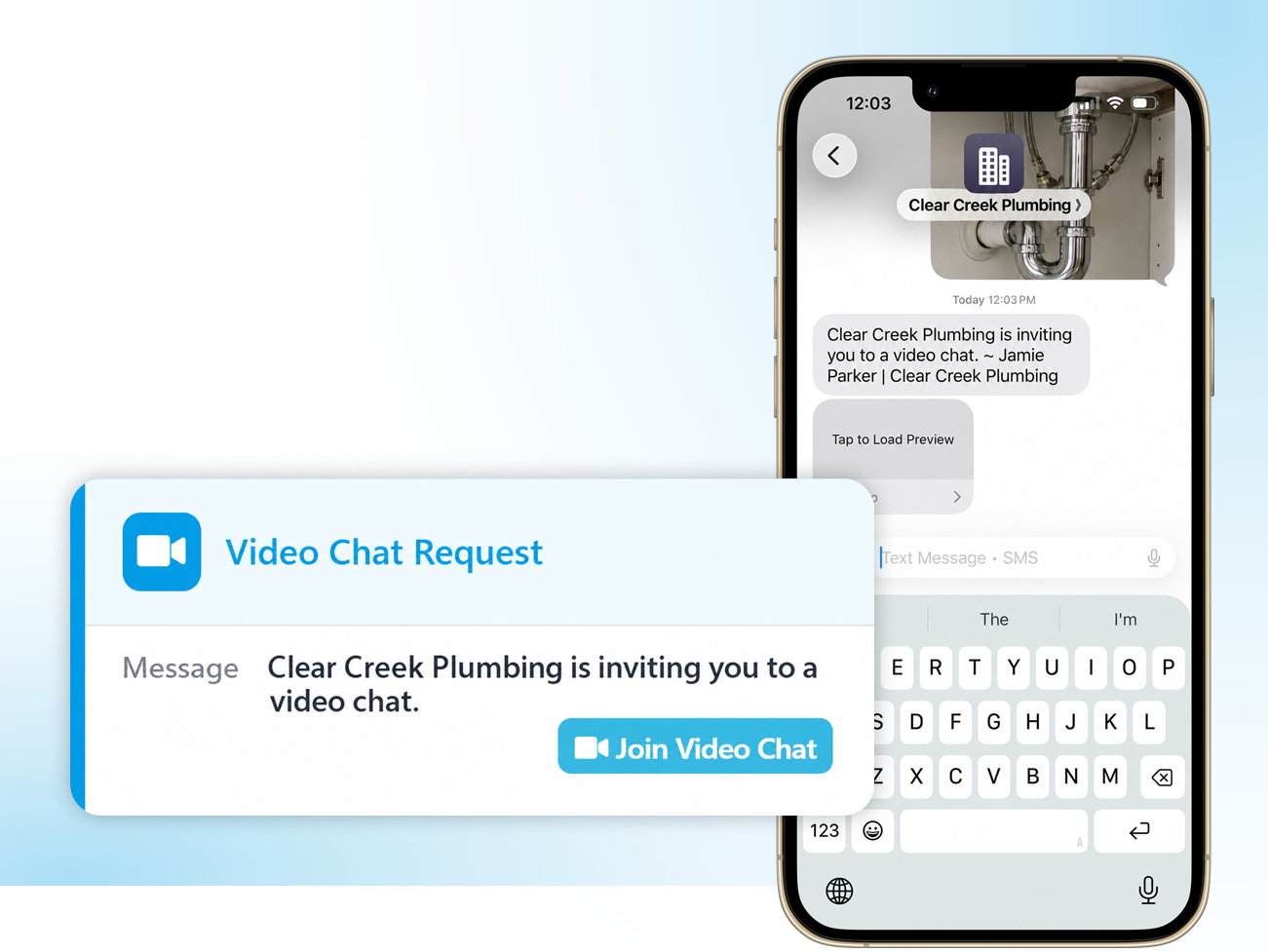
Start It from the Conversation
- Open the three-dot menu in the message field and choose Invite to Video Chat.
- A template appears. Edit it if you want and send.
- Works from your desktop browser with a webcam, or from the Captivated mobile app in the field.
They Tap, Allow & You're Live
- The customer taps the link in the text, hits Accept and Join, and allows camera and microphone.
- Nothing to download. No account. No meeting ID to read aloud.
- The video call is initiated from the conversation, so everything remains connected.
Four Ways Teams Actually Use It
- Show product: walk prospective buyers through a physical product.
- Virtual diagnostics: "To serve you, we now offer a virtual service visit."
- Follow-up consults: clinicians answer a question that doesn't justify an in-person visit.
- Progress walkthroughs: show a customer the work completed on their job without being present.
Built Perfectly for the Field
- Rear camera support means sharing your view couldn't be easier.
- Runs on the mobile app, so a technician on site can start a call as easily as someone at a desk.
- Pair it with Secure Chat when the conversation itself needs protecting.
Fast, Simple & Effective Video. That Just Works.
Your prospects and customers deserve the best experience possible, especially where video is needed to best manage your conversations. That's why we provide a path from "I wish you could see this" to actually seeing it. No more confusion or time wasted. Just a more-than-satisfied customer.
1200+
businesses served across a decade of business texting.
98%
of our customers would recommend Captivated to industry peers.
5 Star
Google reviews and SOC 2, HIPAA and CCPA credentials.
90%
report reduced admin effort and improved efficiency.
Live
U.S.-based support from real people.
With Video Chat from Captivated
Instantly connect with your audience through a quick text invitation. No software downloads are needed for your clients or patients, perfect for virtual services, sales visits, or tele-health appointments.

Erbert Lawns
Switching to Captivated has revolutionized how we organize our booking calendars. We no longer lose hours to endless outbound calls. Our clients appreciate the pre-service reminders and instant completion updates, keeping our technicians moving efficiently and our schedules completely predictable.
– Customer Service Representative
3 Steps to Your First Video Call
Get your personalized pricing.
Build your quote online (no sales call required). Or book a demo. Either way, we look forward to serving you!
We turn it on.
Once you're using Captivated, there is genuinely nothing to configure on your side. Our team enables the feature and builds your Video Chat invitation template.
Send one to yourself.
Most teams try it on their own phone first, realize how fast it is, and start using it the same afternoon.
Important Note: One site license. Unlimited users (no "per seat" billing nonsense, ever). Real humans in support, and a launch team that does the setup with you.
What Changes When a Video Chat Takes Only Seconds to Start
Setup for the Customer
Without This Service:
Download an app, create an account, join a meeting ID
With Captivated:
Tap a link, allow camera and microphone
Practical Impact:
Video becomes possible for spontaneous conversations
Approving Recommended Work
Without This Service:
A verbal description the customer cannot evaluate
With Captivated:
They see the part, the wear, the problem
Practical Impact:
Informed decisions instead of "let me think about it"
Follow-Up Visits
Without This Service:
An appointment, a drive, and time off work
With Captivated:
A short video call from wherever they are
Practical Impact:
Less friction for them, more capacity for you
Where It Runs
Without This Service:
A separate meeting platform outside your records
With Captivated:
Launched from the conversation, alongside the full history
Practical Impact:
Context stays with the customer relationship
The Bottom Line
Without it: you or your customer keeps describing things that, in reality, just need to be seen. You both are confused, if not frustrated, when the simple solution is within your reach.
Frequently Asked Questions
No. They tap the link in your text, hit Accept and Join, and allow camera and microphone access. The call opens in their phone's browser. There is nothing to install and no account to create.
Yes. Video chat runs from the Captivated mobile app as well as your desktop browser, and you can flip to the rear camera, which is how most technicians and salespeople actually use it.
Almost always a browser permissions issue. If you can see and hear yourself but they can't, the problem is on their end. If you can't see yourself, switch browsers — Chrome to Safari or the reverse — to reset permissions, or reinstall your browser app.
The invitation and session are generated by Captivated and launched from within the conversation rather than a public meeting link. For conversations where the content itself is sensitive, pair video with Secure Chat and review our security documentation with your compliance lead.
Availability varies by plan. See real pricing, or ask during your demo and we'll tell you exactly what your setup includes.
Ready to Show Instead of Tell?
Book a 30-minute demo and we'll send you a video invitation during the call, so you can see how fast it actually is.
Already a customer? Text Captivated Support at 317-316-3600.
